Skip to content
AICPA-CIMA
  • AICPA & CIMA:
  • Home
  • Engage 365 Communities
  • CPE & Learning
  • My Account
Journal of Accountancy
  • TECH & AI
    • All articles
    • Artificial Intelligence (AI)
    • Microsoft Excel
    • Information Security & Privacy

    Latest Stories

    • Are finance leaders moving too fast on agentic AI?
    • Drafting an AI policy that actually works
    • What AI agents mean for CPA firms

  • TAX
    • All articles
    • Corporations
    • Employee benefits
    • Individuals
    • IRS procedure

    Latest Stories

    • IRS raises standard mileage rates for remainder of 2026
    • PEEC finalizes revisions to tax services independence guidance
    • IRS designates certain CRAT arrangements as listed transactions
  • PRACTICE MANAGEMENT
    • All articles
    • Diversity, equity & inclusion
    • Human capital
    • Firm operations
    • Practice growth & client service

    Latest Stories

    • PCAOB seeks feedback on its 5-year strategic plan
    • Are finance leaders moving too fast on agentic AI?
    • Why social media ‘failures’ can be big wins for small firms
  • FINANCIAL REPORTING
    • All articles
    • FASB reporting
    • IFRS
    • Private company reporting
    • SEC compliance and reporting

    Latest Stories

    • SEC eyes e-delivery as the default over paper
    • SEC shares 3 goals in proposed 2026–2030 strategic plan
    • SEC proposes rescission of climate disclosure rules
  • AUDIT
    • All articles
    • Attestation
    • Audit
    • Compilation and review
    • Peer review
    • Quality Management

    Latest Stories

    • PCAOB seeks feedback on its 5-year strategic plan
    • AICPA updates audit standards related to external confirmations
    • PCAOB consultation process offers new options for firms seeking guidance
  • MANAGEMENT ACCOUNTING
    • All articles
    • Business planning
    • Human resources
    • Risk management
    • Strategy

    Latest Stories

    • Are finance leaders moving too fast on agentic AI?
    • How to handle increased enforcement of unclaimed property notices
    • Standardization of sustainability reporting improves, but obstacles remain
  • Home
  • News
  • Magazine
  • Podcast
  • Topics
Advertisement
  1. newsletter
  2. Extra Credit
Extra Credit Cover

Calculating depreciation using the SLN function

By Wendy Tietz, CPA, CGMA, Ph.D.; Jennifer Cainas, CPA, DBA; and Tracie Miller-Nobles, CPA
September 8, 2020

Please note: This item is from our archives and was published in 2020. It is provided for historical reference. The content may be out of date and links may no longer function.

Related

August 11, 2020

Use conditional formatting in Excel to visualize letter grades

May 12, 2020

Use Excel PivotTables to quickly analyze grades

When teaching depreciation in Introduction to Accounting, faculty always cover a variety of different depreciation methods, including straight-line depreciation. Next time you teach this topic, build your students’ Excel skills by showing them how to use the straight-line (SLN) function in Excel. Below you will see an example screenshot of a fixed asset report for a company:
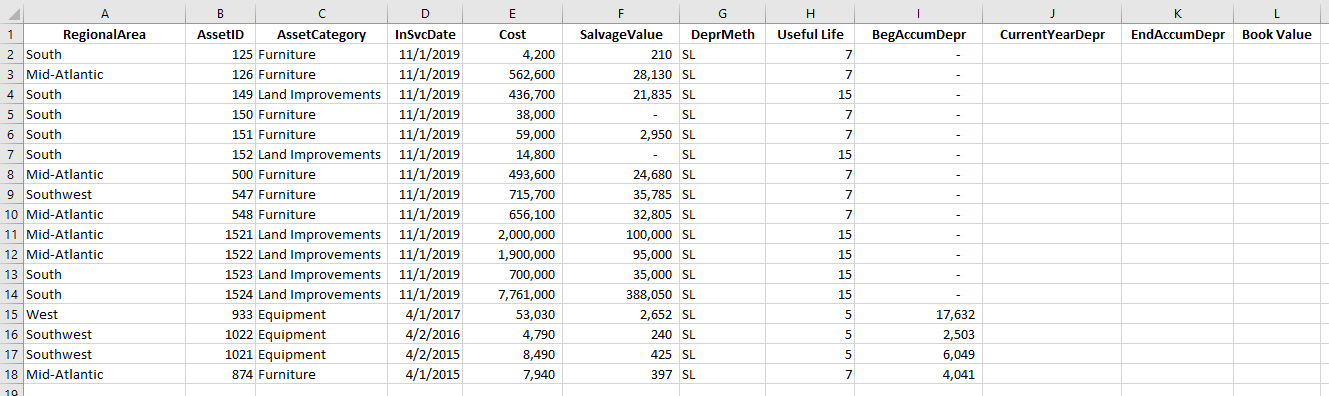
fixed-asset-report


To calculate the current year depreciation, you will use the SLN function. Here’s how:

Step 1: Insert Function. Click in the cell where you would like to insert the formula. In this example, I will use cell J2. Click on the function symbol (ƒx) next to the formula bar.
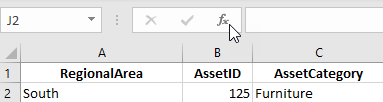
insert-function


Step 2: Search and select the SLN function.
Type the function abbreviation, in this case SLN, in the box that says, “Search for a function,” and press Enter. Select SLN in the “Select a function” box, then click OK.

If you don’t know the function abbreviation, you can search for it by using the “Search for a function” box. In this case, you would type in “Straight line” and then click Go. Excel then suggests functions that you can select. Select the SLN function and click OK.

select-sln


Step 3: Identify the function arguments.
In the Function Arguments box, click in the Cost box. Either type the cell reference or select the cell with your mouse for the cost (for example, cell E2). Next, click in the Salvage box and type the cell reference or select the cell for the salvage value (cell F2). Follow the same procedure for asset life (cell H2 in this example). Click OK.

sln-function-arguments


The straight-line depreciation will be calculated.

Advertisement

Step 4: Copy the formula to the remaining cells. To quickly copy the formula to the remaining cells, move your mouse to the lower right-hand corner of the cell until the cursor becomes a black plus sign. Double-click. 
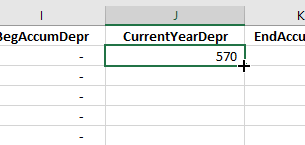
plus-sign


The straight-line depreciation formula will now be copied to the remaining cells.
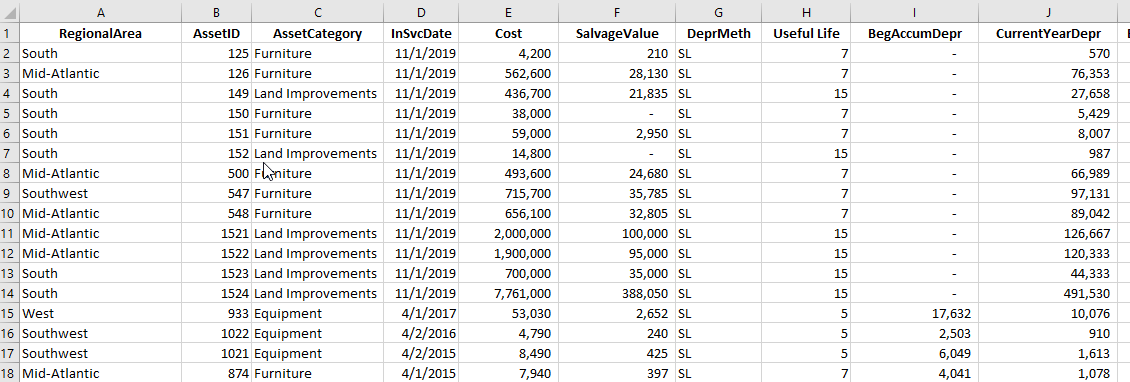
depreciation-formula


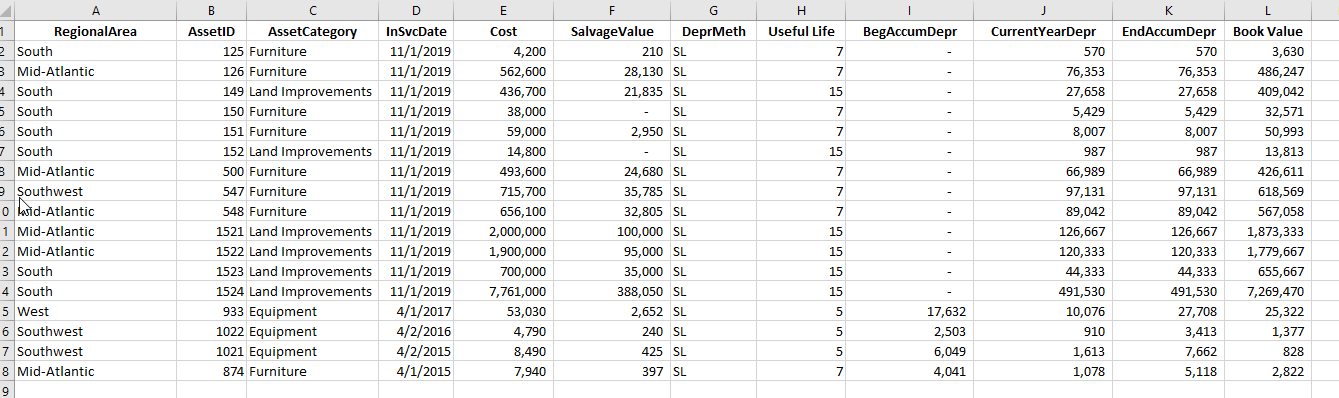
To complete the fixed asset report, you would then use a formula to calculate Ending Accumulated Depreciation by adding Beginning Accumulated Depreciation plus Current Year Depreciation. You’d also calculate Book Value by subtracting Ending Accumulated Depreciation from Cost.
book-value


See this short tutorial video for an overview of how to complete the fixed asset report using the straight-line (SLN) function.

— Wendy Tietz, CPA, CGMA, Ph.D., is a professor of accounting at Kent State University in Kent. Ohio; Jennifer Cainas, CPA, DBA, is an instructor of accountancy at the University of South Florida in Tampa; and Tracie Miller-Nobles, CPA, is an associate professor of accounting at Austin Community College in Austin, Texas. See their site AccountingIsAnalytics.com for resources they have developed for teaching data analytics in introductory accounting. To comment on this article or to suggest an idea for another article, contact senior editor Courtney Vien at Courtney.Vien@aicpa-cima.com.


Advertisement

latest news

July 22, 2026

PCAOB seeks feedback on its 5-year strategic plan

July 21, 2026

Are finance leaders moving too fast on agentic AI?

July 20, 2026

Why social media ‘failures’ can be big wins for small firms

July 16, 2026

SEC eyes e-delivery as the default over paper

July 15, 2026

IRS raises standard mileage rates for remainder of 2026

Advertisement

Most Read

IRS raises standard mileage rates for remainder of 2026
Eligible taxpayers to get automatic IRS penalty relief
IRS adds online option, details for Kwong-related refund claims
Self-directed IRAs: A tax compliance black hole
IRS seeks examples of incorrect CP53E notices
Advertisement

Podcast

July 16, 2026

Awkward silence is OK — and other networking secrets

July 9, 2026

From estate planning to AI: Managing CPA liability

July 2, 2026

The AICPA’s CEO on trust, AI, and the profession’s future

Features

Start in high school to strengthen the accounting profession

Start in high school to strengthen the accounting profession

Accountancy in America: Meeting the moment for 250 years

Accountancy in America: Meeting the moment for 250 years

A guide to fighting AI-fueled AP/AR fraud

A guide to fighting AI-fueled AP/AR fraud

How to handle increased enforcement of unclaimed property notices

How to handle increased enforcement of unclaimed property notices

How to tame funding volatility in not-for-profits

How to tame funding volatility in not-for-profits

What AI agents mean for CPA firms
Accordance

What AI agents mean for CPA firms

FROM THIS MONTH'S ISSUE

Cannabis dispensary denied ERC

The Court of Federal Claims held that Sec. 280E, which prohibits deductions and credits for businesses trafficking in controlled substances, applies to the employee retention credit (ERC), including its refundable portion, and denied a cannabis business’s claim for a refundable ERC.

From The Tax Adviser

June 30, 2026

Condo casualty losses: Deductions for common-interest property

May 31, 2026

Trust distributions: Timing, tax, and practical considerations

May 31, 2026

Current developments in taxation of individuals: Part 3

April 30, 2026

Current developments in taxation of individuals: Part 2

MAGAZINE

July 2026

July 2026

July 2026
June 2026

June 2026

June 2026
May 2026

May 2026

May 2026
April 2026

April 2026

April 2026
March 2026

March 2026

March 2026
February 2026

February 2026

February 2026
January 2026

January 2026

January 2026
December 2025

December 2025

December 2025
November 2025

November 2025

November 2025
October 2025

October 2025

October 2025
September 2025

September 2025

September 2025
August 2025

August 2025

August 2025
view all

View All

http://JofA_Default_Mag_cover_small_official_blue

PUSH NOTIFICATIONS

Learn about important news

This quick guide walks you through the process of enabling and troubleshooting push notifications from the JofA on your computer or phone.

CPA LETTER DAILY EMAIL

CPA Letter Logo

Subscribe to the daily CPA Letter

Stay on top of the biggest news affecting the profession every business day. Follow this link to your marketing preferences on aicpa-cima.com to subscribe. If you don't already have an aicpa-cima.com account, create one for free and then navigate to your marketing preferences.

Connect

  • X Logo JofA on X
  • facebook JofA on Facebook

HOME

  • News
  • Monthly issues
  • Podcast
  • A&A Focus
  • PFP Digest
  • Academic Update
  • Topics
  • RSS feed rss feed
  • Site map

ABOUT

  • Contact us
  • Advertise
  • Submit an article
  • Editorial calendar
  • Privacy policy
  • Terms & conditions

SUBSCRIBE

  • Academic Update
  • CPE Express

AICPA & CIMA SITES

  • AICPA-CIMA.com
  • Global Engagement Center
  • Financial Management (FM)
  • The Tax Adviser
  • AICPA Insights
  • Global Career Hub
AICPA & CIMA

© 2026 Association of International Certified Professional Accountants. All rights reserved.

Reliable. Resourceful. Respected.