Skip to content
AICPA-CIMA
  • AICPA & CIMA:
  • Home
  • Engage 365 Communities
  • CPE & Learning
  • My Account
Journal of Accountancy
  • TECH & AI
    • All articles
    • Artificial Intelligence (AI)
    • Microsoft Excel
    • Information Security & Privacy

    Latest Stories

    • Drafting an AI policy that actually works
    • What AI agents mean for CPA firms
    • A guide to fighting AI-fueled AP/AR fraud

  • TAX
    • All articles
    • Corporations
    • Employee benefits
    • Individuals
    • IRS procedure

    Latest Stories

    • Corporation’s officer held personally liable for its taxes under Federal Priority Statute
    • District court upholds final microcaptive reporting regulations
    • Cannabis dispensary denied ERC
  • PRACTICE MANAGEMENT
    • All articles
    • Diversity, equity & inclusion
    • Human capital
    • Firm operations
    • Practice growth & client service

    Latest Stories

    • FASB seeks comment on fair value reporting proposal
    • Start in high school to strengthen the accounting profession
    • Drafting an AI policy that actually works
  • FINANCIAL REPORTING
    • All articles
    • FASB reporting
    • IFRS
    • Private company reporting
    • SEC compliance and reporting

    Latest Stories

    • SEC shares 3 goals in proposed 2026–2030 strategic plan
    • SEC proposes rescission of climate disclosure rules
    • SEC proposes semiannual reporting option for public companies
  • AUDIT
    • All articles
    • Attestation
    • Audit
    • Compilation and review
    • Peer review
    • Quality Management

    Latest Stories

    • Standardization of sustainability reporting improves, but obstacles remain
    • How to monitor a firm’s system of quality management
    • AICPA guides peer reviewers to address SOC 2 risks
  • MANAGEMENT ACCOUNTING
    • All articles
    • Business planning
    • Human resources
    • Risk management
    • Strategy

    Latest Stories

    • How to handle increased enforcement of unclaimed property notices
    • Standardization of sustainability reporting improves, but obstacles remain
    •  What it takes for a CFO to lead operations and tech
  • Home
  • News
  • Magazine
  • Podcast
  • Topics
Advertisement
  1. newsletter
  2. Extra Credit
Extra Credit Cover

Calculating the issue price of a bond using the NPV function in Excel

By Wendy Tietz, CPA, Ph.D.; Jennifer Cainas, CPA, DBA; and Tracie Miller-Nobles, CPA
December 7, 2021

Please note: This item is from our archives and was published in 2021. It is provided for historical reference. The content may be out of date and links may no longer function.

Related

December 7, 2021

A road map for learning data analytics

November 9, 2021

Performing a simple linear regression in Excel

TOPICS

  • Technology
    • Microsoft Excel
  • Accounting Education

When teaching financial accounting, faculty often discuss bonds payable and how to calculate the issue price of a bond. The next time you cover this topic, consider teaching students how to calculate the issue price by using the net present value function (NPV) in Excel.

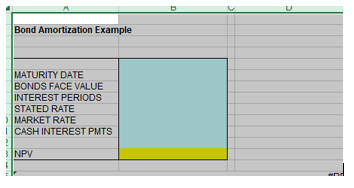
Here’s an example: Suppose a company issues a $1,000,000, six-year, 6% bond when the market rate of interest is 10%, and you want the students to calculate its issue price. Below is a screenshot of an Excel file showing how to begin setting up the facts regarding the bond.
npv-1-bond-amortization-example

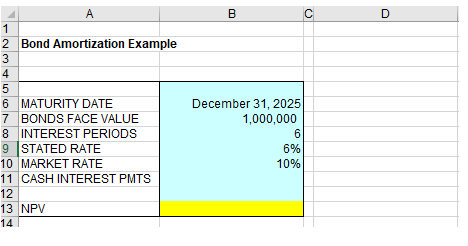
As a best practice, create an input area (shown in blue here) where users can enter the bond facts and then use this information to calculate the bond issue price (in yellow). First, enter the bond criteria given, including its maturity date, the face value of the bond, the number of compounding periods, the stated rate of the bond, and the market rate at the time the bonds were issued.
npv-2-bond-amortization-example

Next, you need to determine the cash interest payments that will be paid to the bondholders each compounding period (in this case, annually). Recall that to calculate this, you multiply the stated rate of the bond by its face (or maturity) value.

In the cell for cash interest payments, input the equal sign (=) followed by the appropriate cell references (here, B9 and B7), separated by the asterisk (*) to multiply them, as shown below. By using cell references, you can change either the stated rate or the bond face value and your calculations will automatically update.

npv-3-bond-amortization-example

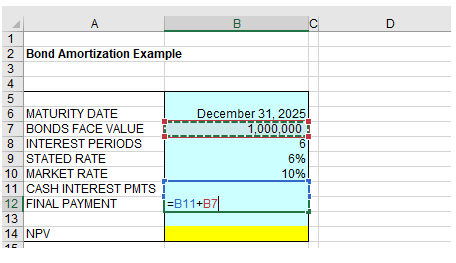
Next, create a cell for the final payment in year 6, which will include both a final interest payment ($60,000) plus the maturity value of the bond ($1,000,000). Input the equal sign in this cell, followed by the appropriate cell numbers (here, B11 and B7) separated by the plus sign (+), as shown below. Again, use cell references so that if the data changes, your final payment information will also change.
npv-4-bond-amortization-example

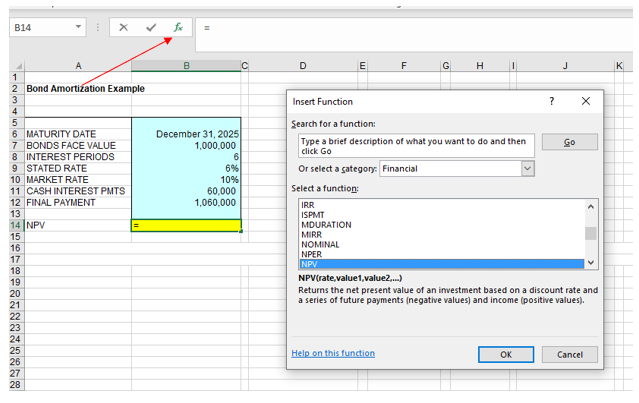
Now that your input area is finished you can use the information to calculate the issue price of the bond using the NPV function in Excel. From your NPV cell (B14) begin by clicking on the fx button to the left of the formula bar and a pop-up menu titled Insert Function will appear. In the box beside the words “Or select a category,” click the drop-down menu and select Financial. You can then scroll to find the NPV function. Click OK.
Advertisement
npv-5-bond-amortization-example

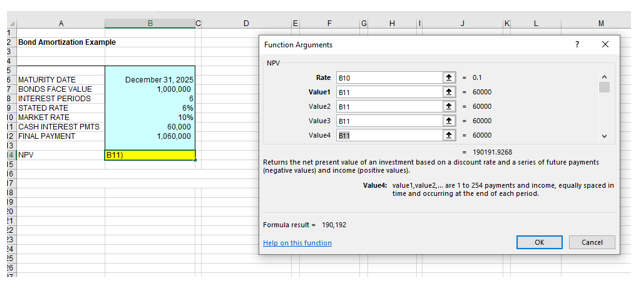
A new pop-up window titled Function Arguments will appear. Here, you will enter the criteria of the bond. The Rate is the market rate of interest, and then you must enter the cash value that will be paid each year. Since you have already calculated these amounts within your input area, you can just input the numbers of those cells (B10 for Rate and B11 for Value). (Note: The pop-up window will originally only show two Value boxes, Value1 and Value2. Pressing Tab after you input a value in a Value box will cause another Value box to appear below it. You can also scroll down to see value boxes past Value4.)
npv-6-bond-amortization-example

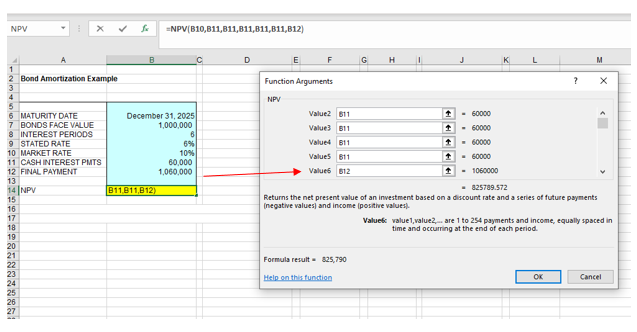
Recall from the facts that this bond will pay interest each year but that in the final year, both the interest payment and the face value of the bond will be paid to the bondholders, listed in our input area as Final Payment. Therefore, in box Value6, you will input cell number B12 rather than B11.
npv-7-bond-amortization-example

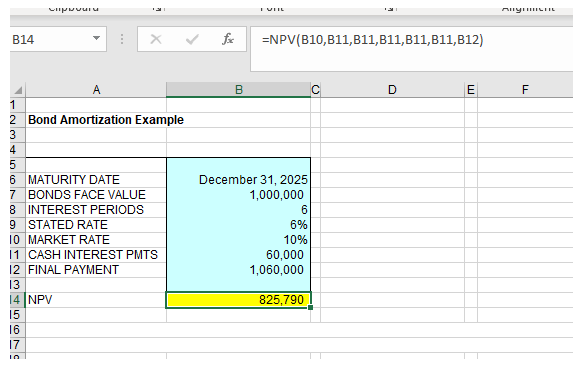
Once you click OK, the NPV will be calculated and displayed in the NPV cell. You will also see the formula for NPV in the formula bar.
npv-8-bond-amortization-example

The next time you discuss bonds payable, consider expanding your students’ Excel skills by teaching them how to perform a net present value calculation using the NPV function. It is one of many financial functions your students can learn to use, quickly and easily.

— Wendy Tietz, CPA, CGMA, Ph.D., is a professor of accounting at Kent State University in Kent, Ohio; Jennifer Cainas, CPA, DBA, is a clinical professor at the University of South Florida in Tampa; and Tracie Miller-Nobles, CPA, is an associate professor of accounting at Austin Community College in Austin, Texas. See their site AccountingIsAnalytics.com for resources they have developed for teaching data analytics in introductory accounting. To comment on this article or to suggest an idea for another article, contact senior editor Courtney Vien at Courtney.Vien@aicpa-cima.com.


Advertisement

latest news

July 2, 2026

FASB seeks comment on fair value reporting proposal

June 30, 2026

IRS seeks examples of incorrect CP53E notices

June 29, 2026

IRS offers gift tax safe harbor for contributions to Trump accounts

June 29, 2026

Standardization of sustainability reporting improves, but obstacles remain

June 26, 2026

IRS outlines AI risks, Circular 230 duties for tax practitioners

Advertisement

Most Read

How to build reusable Skills in Anthropic's Claude AI
Profession Ready Initiative targets gaps in early-career CPA readiness
IRS seeks examples of incorrect CP53E notices
4 ways sole practitioners can set themselves apart
Using Excel to identify financial statement red flags
Advertisement

Podcast

July 2, 2026

The AICPA’s CEO on trust, AI, and the profession’s future

June 25, 2026

Midyear advocacy update: STEM, BOI, taxes and licensure

June 18, 2026

Why mindset may matter more than technology adoption

Features

Start in high school to strengthen the accounting profession

Start in high school to strengthen the accounting profession

Accountancy in America: Meeting the moment for 250 years

Accountancy in America: Meeting the moment for 250 years

A guide to fighting AI-fueled AP/AR fraud

A guide to fighting AI-fueled AP/AR fraud

How to handle increased enforcement of unclaimed property notices

How to handle increased enforcement of unclaimed property notices

How to tame funding volatility in not-for-profits

How to tame funding volatility in not-for-profits

What AI agents mean for CPA firms
Accordance

What AI agents mean for CPA firms

FROM THIS MONTH'S ISSUE

Accountancy in America: Meeting the moment for 250 years

As the United States celebrates its semiquincentennial, explore the history of the accountancy profession’s essential role in the U.S. economy.

From The Tax Adviser

June 30, 2026

Condo casualty losses: Deductions for common-interest property

May 31, 2026

Trust distributions: Timing, tax, and practical considerations

May 31, 2026

Current developments in taxation of individuals: Part 3

April 30, 2026

Current developments in taxation of individuals: Part 2

MAGAZINE

July 2026

July 2026

July 2026
June 2026

June 2026

June 2026
May 2026

May 2026

May 2026
April 2026

April 2026

April 2026
March 2026

March 2026

March 2026
February 2026

February 2026

February 2026
January 2026

January 2026

January 2026
December 2025

December 2025

December 2025
November 2025

November 2025

November 2025
October 2025

October 2025

October 2025
September 2025

September 2025

September 2025
August 2025

August 2025

August 2025
view all

View All

http://JofA_Default_Mag_cover_small_official_blue

PUSH NOTIFICATIONS

Learn about important news

This quick guide walks you through the process of enabling and troubleshooting push notifications from the JofA on your computer or phone.

CPA LETTER DAILY EMAIL

CPA Letter Logo

Subscribe to the daily CPA Letter

Stay on top of the biggest news affecting the profession every business day. Follow this link to your marketing preferences on aicpa-cima.com to subscribe. If you don't already have an aicpa-cima.com account, create one for free and then navigate to your marketing preferences.

Connect

  • X Logo JofA on X
  • facebook JofA on Facebook

HOME

  • News
  • Monthly issues
  • Podcast
  • A&A Focus
  • PFP Digest
  • Academic Update
  • Topics
  • RSS feed rss feed
  • Site map

ABOUT

  • Contact us
  • Advertise
  • Submit an article
  • Editorial calendar
  • Privacy policy
  • Terms & conditions

SUBSCRIBE

  • Academic Update
  • CPE Express

AICPA & CIMA SITES

  • AICPA-CIMA.com
  • Global Engagement Center
  • Financial Management (FM)
  • The Tax Adviser
  • AICPA Insights
  • Global Career Hub
AICPA & CIMA

© 2026 Association of International Certified Professional Accountants. All rights reserved.

Reliable. Resourceful. Respected.