Skip to content
AICPA-CIMA
  • AICPA & CIMA:
  • Home
  • CPE & Learning
  • My Account
Journal of Accountancy
  • TECH & AI
    • All articles
    • Artificial Intelligence (AI)
    • Microsoft Excel
    • Information Security & Privacy

    Latest Stories

    • Executive turnover slows, but AI strategy remains unclear
    • Use Excel dynamic arrays to build a revenue-testing schedule that auto-refreshes
    • Optimize Windows 11 with these 8 settings tweaks
  • TAX
    • All articles
    • Corporations
    • Employee benefits
    • Individuals
    • IRS procedure

    Latest Stories

    • IRS flagged FATCA noncompliance but followed up with few exams, penalties
    • Uncredentialed tax preparer errors included fictitious deductions, review shows
    • IRS finalizes deduction rules for tips, adds 3 eligible jobs
  • PRACTICE MANAGEMENT
    • All articles
    • Diversity, equity & inclusion
    • Human capital
    • Firm operations
    • Practice growth & client service

    Latest Stories

    • GASB seeks feedback on idea of changing how it communicates GAAP
    • Experts answer burning questions about personal financial security
    • IRS flagged FATCA noncompliance but followed up with few exams, penalties
  • FINANCIAL REPORTING
    • All articles
    • FASB reporting
    • IFRS
    • Private company reporting
    • SEC compliance and reporting

    Latest Stories

    • SEC proposes amendments to small entity definitions
    • Key signals from the SEC-PCAOB conference point to a busy new year
    • New SEC chair to CPAs: ‘Back to basics’
  • AUDIT
    • All articles
    • Attestation
    • Audit
    • Compilation and review
    • Peer review
    • Quality Management

    Latest Stories

    • Audit report card: More internal audit teams suffered cuts in 2025
    • Auditing Standards Board proposes changes to attestation standards
    • Change at the top: PCAOB will feature new chair, 3 new board members
  • MANAGEMENT ACCOUNTING
    • All articles
    • Business planning
    • Human resources
    • Risk management
    • Strategy

    Latest Stories

    • Audit report card: More internal audit teams suffered cuts in 2025
    • Optimism, while tempered, is up among finance leaders
    • AI early adopters pull ahead but face rising risk, global report finds
  • Home
  • News
  • Magazine
  • Podcast
  • Topics
Advertisement
  1. newsletter
  2. Extra Credit
Extra Credit Cover

Performing a simple linear regression in Excel

By Wendy Tietz, CPA, Ph.D.; Jennifer Cainas, CPA, DBA; and Tracie Miller-Nobles, CPA
November 9, 2021

Please note: This item is from our archives and was published in 2021. It is provided for historical reference. The content may be out of date and links may no longer function.

TOPICS

  • Technology
    • Microsoft Excel
  • Accounting Education

When teaching cost behavior in a managerial or cost accounting course, we explain that there are various methods a company can use to estimate its fixed and variable costs, including regression analysis. The next time you cover this topic, consider teaching students how to perform a simple linear regression analysis in Excel.  Below is an example screenshot illustrating 12 months of cost data for a restaurant.  

ec1-regression-analysis-example

To perform a simple linear regression to estimate the restaurant’s fixed and variable costs, perform the following steps.  

Step 1: Click on the Data tab, and then click Data Analysis (in the Analysis group). (Note: If you don’t have the Data Analysis option, you will need to install the Analysis ToolPak add-in. See our previous article on how to do this.)

ec2-data-analysis

Step 2: Select Regression and then click OK.

ec3-regression

Step 3: In the Regression dialog box that pops up, you must identify your Y variable, which is the dependent variable. In this example the dependent variable is the “total costs” column. Select the data in this column.

ec4-regression-input-y-range

Step 4: You must also identify your X variable, which is your independent variable. In this example the independent variable is the “# of meals” column. Select the data in this column, then click OK. 

ec5-regression-input-x-range

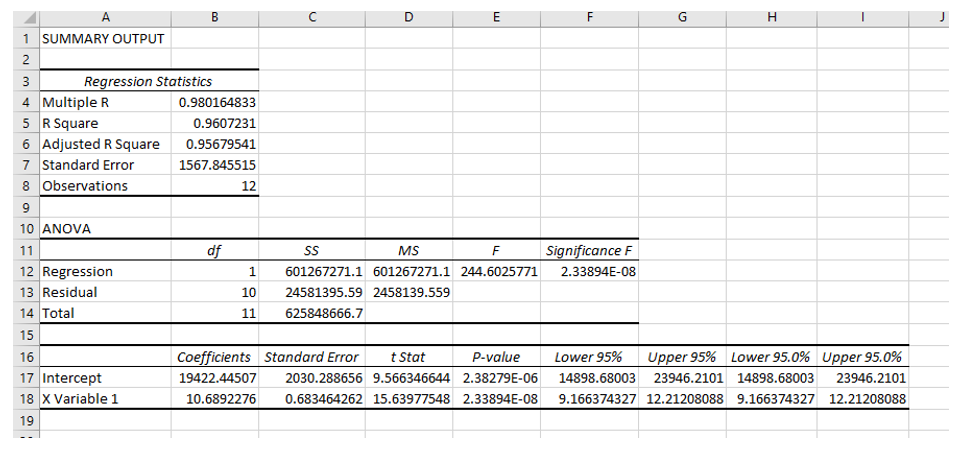
The default option is for the regression results to be inserted into a new worksheet. You will see the results in a different place if you have selected a different output option. We chose to have the regression results inserted into Sheet2 of our workbook, and the results are below:  
Advertisement
ec6-summary-output

Now that you have the regression results, you can discuss with the students the key pieces of information being displayed, including the coefficients (the intercept representing the fixed costs, and the X variable 1 representing the variable costs) and how to interpret the R square and adjusted R square values.

The next time you teach cost behavior, consider expanding your students’ Excel skills by teaching them how to perform a simple linear regression, one of the many options within the Data Analysis function.

— Wendy Tietz, CPA, CGMA, Ph.D., is a professor of accounting at Kent State University in Kent. Ohio; Jennifer Cainas, CPA, DBA, is a clinical professor at the University of South Florida in Tampa; and Tracie Miller-Nobles, CPA, is an associate professor of accounting at Austin Community College in Austin, Texas. See their site AccountingIsAnalytics.com for resources they have developed for teaching data analytics in introductory accounting. To comment on this article or to suggest an idea for another article, contact senior editor Courtney Vien at Courtney.Vien@aicpa-cima.com.


Advertisement

latest news

April 16, 2026

GASB seeks feedback on idea of changing how it communicates GAAP

April 15, 2026

Experts answer burning questions about personal financial security

April 15, 2026

IRS flagged FATCA noncompliance but followed up with few exams, penalties

April 13, 2026

Uncredentialed tax preparer errors included fictitious deductions, review shows

April 13, 2026

IRS finalizes deduction rules for tips, adds 3 eligible jobs

Advertisement

Most Read

How will accountants learn new skills when AI does the work?
Excel’s Dark Mode: A subtle change that makes a big difference
Court determines taxpayer lacked profit motive
Elder fraud rises as scammers use AI
Luxury liabilities: Serving high-net-worth clients
Advertisement

Podcast

April 16, 2026

A Machu Picchu moment and what it means for aging and retirement

April 8, 2026

What small firms are getting right about tech and why they’re not alone

April 2, 2026

Liability lessons on documentation, high-profile clients, CAS engagement letters

Features

Elder fraud rises as scammers use AI

Elder fraud rises as scammers use AI

How to protect nonprofits from hidden fraud risks

How to protect nonprofits from hidden fraud risks

Ways to de-risk concentrated stock portfolios

Ways to de-risk concentrated stock portfolios

How are finance teams really using AI and automation?

How are finance teams really using AI and automation?

SPONSORED REPORT

Tools for finding CAS clients

How to find the right CAS clients

The key to success with CAS is selecting the best clients. Tools like ideal client profiles (ICPs), buyer personas, and even artificial intelligence can help identify the businesses that best fit each CAS practice.

From The Tax Adviser

March 31, 2026

Current developments in taxation of individuals: Part 1

March 31, 2026

Current Developments in Taxation of Individuals: Part 1

March 31, 2026

Considerations for intergenerational split-dollar arrangements

March 6, 2026

Navigating the Form 1099-DA reporting maze

MAGAZINE

April 2026

April 2026

April 2026
March 2026

March 2026

March 2026
February 2026

February 2026

February 2026
January 2026

January 2026

January 2026
December 2025

December 2025

December 2025
November 2025

November 2025

November 2025
October 2025

October 2025

October 2025
September 2025

September 2025

September 2025
August 2025

August 2025

August 2025
July 2025

July 2025

July 2025
June 2025

June 2025

June 2025
May 2025

May 2025

May 2025
view all

View All

http://JofA_Default_Mag_cover_small_official_blue

PUSH NOTIFICATIONS

Learn about important news

This quick guide walks you through the process of enabling and troubleshooting push notifications from the JofA on your computer or phone.

CPA LETTER DAILY EMAIL

CPA Letter Logo

Subscribe to the daily CPA Letter

Stay on top of the biggest news affecting the profession every business day. Follow this link to your marketing preferences on aicpa-cima.com to subscribe. If you don't already have an aicpa-cima.com account, create one for free and then navigate to your marketing preferences.

Connect

  • X Logo JofA on X
  • facebook JofA on Facebook

HOME

  • News
  • Monthly issues
  • Podcast
  • A&A Focus
  • PFP Digest
  • Academic Update
  • Topics
  • RSS feed rss feed
  • Site map

ABOUT

  • Contact us
  • Advertise
  • Submit an article
  • Editorial calendar
  • Privacy policy
  • Terms & conditions

SUBSCRIBE

  • Academic Update
  • CPE Express

AICPA & CIMA SITES

  • AICPA-CIMA.com
  • Global Engagement Center
  • Financial Management (FM)
  • The Tax Adviser
  • AICPA Insights
  • Global Career Hub
AICPA & CIMA

© 2026 Association of International Certified Professional Accountants. All rights reserved.

Reliable. Resourceful. Respected.