Skip to content
AICPA-CIMA
  • AICPA & CIMA:
  • Home
  • Engage365
  • CPE & Learning
  • My Account
Journal of Accountancy
  • TECH & AI
    • All articles
    • Artificial Intelligence (AI)
    • Microsoft Excel
    • Information Security & Privacy

    Latest Stories

    • AI for CPAs: From efficiency tool to decision engine
    • 9 tips to write more effective AI prompts
    • People skills: You are a human being, not a human doing
  • TAX
    • All articles
    • Corporations
    • Employee benefits
    • Individuals
    • IRS procedure

    Latest Stories

    • Worried about that CP53E QR code? IRS updates FAQs
    • Final regs. modify reporting obligations for Form 8308, Part IV
    • AICPA submits nearly 200 recommendations for IRS guidance plan
  • PRACTICE MANAGEMENT
    • All articles
    • Diversity, equity & inclusion
    • Human capital
    • Firm operations
    • Practice growth & client service

    Latest Stories

    • Worried about that CP53E QR code? IRS updates FAQs
    • FASB issues standard for clarifying environmental credit disclosures
    • Final regs. modify reporting obligations for Form 8308, Part IV
  • FINANCIAL REPORTING
    • All articles
    • FASB reporting
    • IFRS
    • Private company reporting
    • SEC compliance and reporting

    Latest Stories

    • SEC proposes semiannual reporting option for public companies
    • SEC proposes amendments to small entity definitions
    • Key signals from the SEC-PCAOB conference point to a busy new year
  • AUDIT
    • All articles
    • Attestation
    • Audit
    • Compilation and review
    • Peer review
    • Quality Management

    Latest Stories

    • How to monitor a firm’s system of quality management
    • AICPA guides peer reviewers to address SOC 2 risks
    • Proposed new sustainability information AT-C sections
  • MANAGEMENT ACCOUNTING
    • All articles
    • Business planning
    • Human resources
    • Risk management
    • Strategy

    Latest Stories

    • AI for CPAs: From efficiency tool to decision engine
    • Audit report card: More internal audit teams suffered cuts in 2025
    • Optimism, while tempered, is up among finance leaders
  • Home
  • News
  • Magazine
  • Podcast
  • Topics
Advertisement
  1. newsletter
  2. Extra Credit
Extra Credit Cover

Format column headings in Excel to make them easier to read

By Wendy Tietz, CPA, Ph.D.; Jennifer Cainas, CPA, DBA,; and Tracie Miller-Nobles, CPA
May 11, 2021

Please note: This item is from our archives and was published in 2021. It is provided for historical reference. The content may be out of date and links may no longer function.

Consider the following spreadsheet that contains information about student advising:

student-advising


The first row contains the heading for each column. As shown above, the column headings are hard to read because the entire text doesn’t show up due to the column width. There are a few ways we can fix this problem:

  • Adjust the column width,
  • Format the cell to wrap text, or
  • Use control line breaks in the cell.

(Note that these tips will work for any cell, not just column headings.)

Adjust the column width

To increase the column width quickly and easily, you can move your mouse to the far-right edge of the column label area until you see the crosshairs (see below). You then just double-click your mouse, and the column is adjusted to fit the width of the largest content.

columns


If you want to adjust multiple columns at the same time, you can. You will simply select the columns you want to adjust by holding down your Shift key and selecting the continuous columns. Once all of your columns are selected, move your mouse to the far-right edge of the column label area for one of the selected cells. Once you see the crosshairs, double-click the mouse and the adjustment will be made.

Format the cell to wrap text

Another option to adjust the column headings is to format the cell to wrap text. This will allow the text to be on multiple lines as shown below.

wrap-text


To do this, you should select the cells you want to have wrapped text and then right-click. A menu will open and you should select Format Cells. In the Format Cells box, select the Alignment tab, check Wrap text, and then click OK.

Advertisement
format-cells-2


Your column headings text is now being displayed on multiple lines.

Use control line breaks in the cell

Sometimes, when using the previous technique, you might not like where the break in the line occurs. You can control where you want the next line to start in a cell by using line breaks. In this example, say you want to add a line break between “First name” and “and last name.” Double-click in the cell you want to adjust and then move your cursor to where you want the line break. On your keyboard, key Alt and Enter at the same time. (If you are a Mac user, you will key CTRL, OPTN, and ENTER at the same time.)
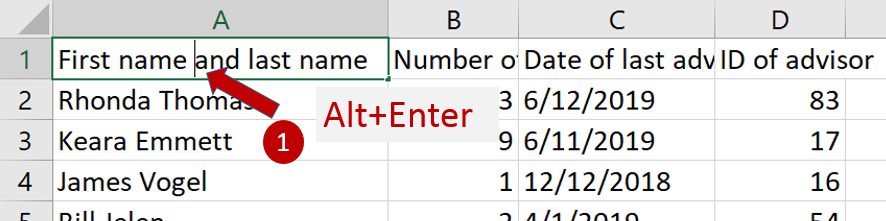
line-breaks


You will now have a line break exactly where you want it in your column heading:
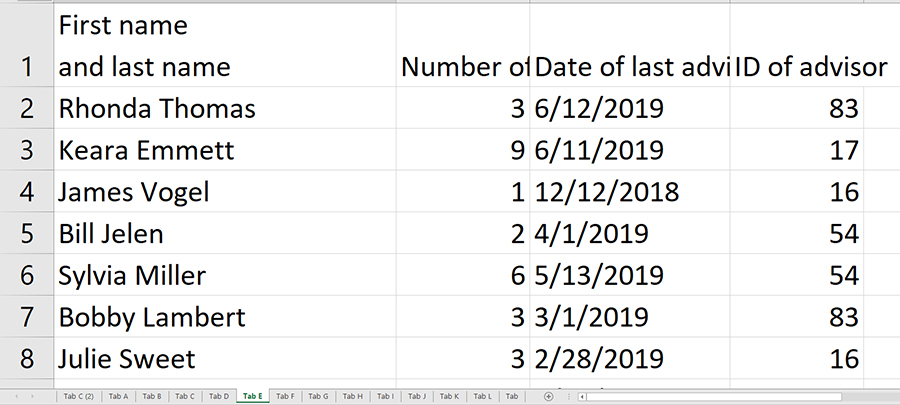
line-breaks-2


— Wendy Tietz, CPA, CGMA, Ph.D., is a professor of accounting at Kent State University in Kent. Ohio; Jennifer Cainas, CPA, DBA, is an instructor of accountancy at the University of South Florida in Tampa; and Tracie Miller-Nobles, CPA, is an associate professor of accounting at Austin Community College in Austin, Texas. See their site
AccountingIsAnalytics.com for resources they have developed for teaching data analytics in introductory accounting. To comment on this article or to suggest an idea for another article, contact JofA senior editor Courtney Vien at Courtney.Vien@aicpa-cima.com.


Advertisement

latest news

May 20, 2026

Worried about that CP53E QR code? IRS updates FAQs

May 19, 2026

FASB issues standard for clarifying environmental credit disclosures

May 19, 2026

Final regs. modify reporting obligations for Form 8308, Part IV

May 15, 2026

AICPA submits nearly 200 recommendations for IRS guidance plan

May 14, 2026

Taxpayers advised they can ignore CP53E notice — after verifying error

Advertisement

Most Read

Taxpayers advised they can ignore CP53E notice — after verifying error
CP53E notice tied to paper-check transition causes confusion
AICPA ENGAGE networking tips: How to make meaningful connections
House panel backs repeal of BOI reporting by domestic companies
Optimize Windows 11 with these 8 settings tweaks
Advertisement

Podcast

May 19, 2026

How CPAs can show their value on National Accounting Day

May 14, 2026

Worrying about what’s next? Take a minute and focus on the present

May 7, 2026

The Auditing Standards Board’s priorities for 2026 and beyond

Features

5 human competencies CPAs need in the AI age

5 human competencies CPAs need in the AI age

People skills: You are a human being, not a human doing

People skills: You are a human being, not a human doing

Avoiding a big tax bill on inherited IRAs

Avoiding a big tax bill on inherited IRAs

Are you making the most of LinkedIn?

Are you making the most of LinkedIn?

SPONSORED REPORT

Tools for finding CAS clients

How to find the right CAS clients

The key to success with CAS is selecting the best clients. Tools like ideal client profiles (ICPs), buyer personas, and even artificial intelligence can help identify the businesses that best fit each CAS practice.

From The Tax Adviser

April 30, 2026

Current developments in taxation of individuals: Part 2

April 30, 2026

Hedge funds: Tax structuring, planning, and compliance

March 31, 2026

Current developments in taxation of individuals: Part 1

March 31, 2026

Current Developments in Taxation of Individuals: Part 1

MAGAZINE

May 2026

May 2026

May 2026
April 2026

April 2026

April 2026
March 2026

March 2026

March 2026
February 2026

February 2026

February 2026
January 2026

January 2026

January 2026
December 2025

December 2025

December 2025
November 2025

November 2025

November 2025
October 2025

October 2025

October 2025
September 2025

September 2025

September 2025
August 2025

August 2025

August 2025
July 2025

July 2025

July 2025
June 2025

June 2025

June 2025
view all

View All

http://JofA_Default_Mag_cover_small_official_blue

PUSH NOTIFICATIONS

Learn about important news

This quick guide walks you through the process of enabling and troubleshooting push notifications from the JofA on your computer or phone.

CPA LETTER DAILY EMAIL

CPA Letter Logo

Subscribe to the daily CPA Letter

Stay on top of the biggest news affecting the profession every business day. Follow this link to your marketing preferences on aicpa-cima.com to subscribe. If you don't already have an aicpa-cima.com account, create one for free and then navigate to your marketing preferences.

Connect

  • X Logo JofA on X
  • facebook JofA on Facebook

HOME

  • News
  • Monthly issues
  • Podcast
  • A&A Focus
  • PFP Digest
  • Academic Update
  • Topics
  • RSS feed rss feed
  • Site map

ABOUT

  • Contact us
  • Advertise
  • Submit an article
  • Editorial calendar
  • Privacy policy
  • Terms & conditions

SUBSCRIBE

  • Academic Update
  • CPE Express

AICPA & CIMA SITES

  • AICPA-CIMA.com
  • Global Engagement Center
  • Financial Management (FM)
  • The Tax Adviser
  • AICPA Insights
  • Global Career Hub
AICPA & CIMA

© 2026 Association of International Certified Professional Accountants. All rights reserved.

Reliable. Resourceful. Respected.