Skip to content

This site uses cookies to store information on your computer. Some are essential to make our site work; others help us improve the user experience. By using the site, you consent to the placement of these cookies. Read our privacy policy to learn more.

Close
AICPA-CIMA
  • AICPA & CIMA:
  • Home
  • CPE & Learning
  • My Account
Journal of Accountancy
  • TECH & AI
    • All articles
    • Artificial Intelligence (AI)
    • Microsoft Excel
    • Information Security & Privacy

    Latest Stories

    • Audit transformation road map: New report lays out the journey
    • As Finance Duties Shift, CAOs Take On Strategic Role
    • Detecting anomalies with Benford’s Law in Excel
  • TAX
    • All articles
    • Corporations
    • Employee benefits
    • Individuals
    • IRS procedure

    Latest Stories

    • IRS clarifies health savings account changes in H.R. 1 in new notice
    • PTEs need more notice of changes, more time to respond, AICPA says
    • IRS announces prop. regs. on international tax law provisions in OBBBA
  • PRACTICE MANAGEMENT
    • All articles
    • Diversity, equity & inclusion
    • Human capital
    • Firm operations
    • Practice growth & client service

    Latest Stories

    • Audit transformation road map: New report lays out the journey
    • IRS clarifies health savings account changes in H.R. 1 in new notice
    • Governmental Audit Quality Center analyzes 2025 OMB Compliance Supplement
  • FINANCIAL REPORTING
    • All articles
    • FASB reporting
    • IFRS
    • Private company reporting
    • SEC compliance and reporting

    Latest Stories

    • New SEC chair to CPAs: ‘Back to basics’
    • SEC accepting Professional Accounting Fellow applications
    • SEC names new chief accountant
  • AUDIT
    • All articles
    • Attestation
    • Audit
    • Compilation and review
    • Peer review
    • Quality Management

    Latest Stories

    • Audit transformation road map: New report lays out the journey
    • Governmental Audit Quality Center analyzes 2025 OMB Compliance Supplement
    • New SEC chair to CPAs: ‘Back to basics’
  • MANAGEMENT ACCOUNTING
    • All articles
    • Business planning
    • Human resources
    • Risk management
    • Strategy

    Latest Stories

    • Overall economic view slides, but CPAs feel better about their companies
    • As Finance Duties Shift, CAOs Take On Strategic Role
    • Managing MNE subsidiaries during tariff shocks
  • Home
  • News
  • Magazine
  • Podcast
  • Topics
Advertisement
  1. newsletter
  2. Extra Credit
Extra Credit Cover

Using range names in Excel

By Wendy Tietz, CPA, Ph.D.; Jennifer Cainas, CPA, DBA; and Tracie Miller-Nobles, CPA
January 11, 2022

Please note: This item is from our archives and was published in 2022. It is provided for historical reference. The content may be out of date and links may no longer function.

Related

No Results

TOPICS

  • Technology
    • Microsoft Excel
  • Accounting Education

Using range names in Excel allows you to quickly navigate to areas of your worksheet and makes formulas much easier to create. A range name is simply a name you assign to a range of data and is much easier to remember than a cell address.

How to name a range

Suppose you have the following data, and you would like to name cells B3 through D3 as Education.
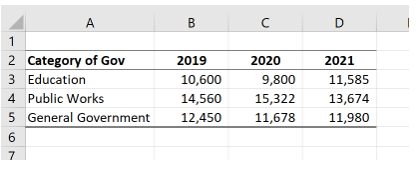
range-names-excel-1

To name a range, select the cells you would like to name. In this example, select cells B3:D3. Click the Name box to the left of the Formula bar and type “Education.” Hit Enter to create the name.

range-names-excel-2

Note that range names cannot have spaces.

Working with range names

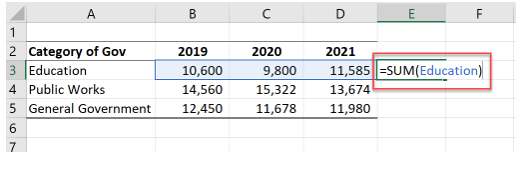
You can now use the range name in a formula. In the formula, you will substitute the name of the range for the cells you would typically reference. Let’s sum the Education range as an example. Click in cell E3 and type the formula =SUM(Education) and hit Enter.
range-names-excel-3

The formula returned the sum of the range name named Education (B3:D3).

Viewing range names

If you have forgotten what range names you have used, you can view all the range names that are in your workbook. To do this, click the drop-down arrow in the Name box to see the named ranges in the workbook.

Advertisement
range-names-excel-4

— Wendy Tietz, CPA, CGMA, Ph.D., is a professor of accounting at Kent State University in Kent, Ohio; Jennifer Cainas, CPA, DBA, is a clinical professor at the University of South Florida in Tampa; and Tracie Miller-Nobles, CPA, is an associate professor of accounting at Austin Community College in Austin, Texas. Their website, Accounting is Analytics, has resources they have developed for teaching data analytics in introductory accounting. To comment on this article or to suggest an idea for another article, contact Courtney Vien at Courtney.Vien@aicpa-cima.com.


Advertisement

latest news

December 10, 2025

Audit transformation road map: New report lays out the journey

December 9, 2025

IRS clarifies health savings account changes in H.R. 1 in new notice

December 9, 2025

Governmental Audit Quality Center analyzes 2025 OMB Compliance Supplement

December 8, 2025

FASB issues standard to improve interim reporting

December 8, 2025

New SEC chair to CPAs: ‘Back to basics’

Advertisement

Most Read

IRS clarifies how employees can claim 2025 tip and overtime deductions
Inflation adjustments to retirement account limits issued for 2026
Going into debt for holiday spending? You’re not alone
AICPA warns that merger of IRS offices would ‘confuse’ taxpayers
Creating an AI agent in ChatGPT
Advertisement

Podcast

December 4, 2025

Where CPAs stand on economic sentiment, what’s next for the JofA podcast

December 2, 2025

JofA branded podcast: Investment management at the intersection of tax and wealth services

November 20, 2025

Accelerating accounting outreach, a CPA leader’s campus return

Features

Rise2040: Envisioning the future of accounting and finance

Rise2040: Envisioning the future of accounting and finance

As Finance Duties Shift, CAOs Take On Strategic Role

As Finance Duties Shift, CAOs Take On Strategic Role

Personal branding and networking strategies for today’s CPA

Personal branding and networking strategies for today’s CPA

Managing MNE subsidiaries during tariff shocks

Managing MNE subsidiaries during tariff shocks

IFRS 18: A fundamental redesign of financial statement presentation

IFRS 18: A fundamental redesign of financial statement presentation

SPONSORED REPORT

Preparing clients for new provisions next tax season

Preparing clients for new provisions next tax season

As the 2025 filing season approaches, H.R. 1 introduces significant tax reforms that CPAs must be prepared to navigate. These legislative changes represent some of the most comprehensive tax updates in recent years, affecting both individual and corporate taxpayers. This report provides in-depth analysis and guidance on H.R. 1.

From The Tax Adviser

November 30, 2025

How a CPA and wealth adviser partnership can guide families through transition

November 30, 2025

Digital asset transactions: Broker reporting, amount realized, and basis

October 31, 2025

Recent developments in estate planning

October 31, 2025

Current developments in taxation of individuals: Part 2

MAGAZINE

December 2025

December 2025

December 2025
November 2025

November 2025

November 2025
October 2025

October 2025

October 2025
September 2025

September 2025

September 2025
August 2025

August 2025

August 2025
July 2025

July 2025

July 2025
June 2025

June 2025

June 2025
May 2025

May 2025

May 2025
April 2025

April 2025

April 2025
March 2025

March 2025

March 2025
February 2025

February 2025

February 2025
January 2025

January 2025

January 2025
view all

View All

http://JofA_Default_Mag_cover_small_official_blue

PUSH NOTIFICATIONS

Learn about important news

This quick guide walks you through the process of enabling and troubleshooting push notifications from the JofA on your computer or phone.

CPA LETTER DAILY EMAIL

CPA Letter Logo

Subscribe to the daily CPA Letter

Stay on top of the biggest news affecting the profession every business day. Follow this link to your marketing preferences on aicpa-cima.com to subscribe. If you don't already have an aicpa-cima.com account, create one for free and then navigate to your marketing preferences.

Connect

  • X Logo JofA on X
  • facebook JofA on Facebook

HOME

  • News
  • Monthly issues
  • Podcast
  • A&A Focus
  • PFP Digest
  • Academic Update
  • Topics
  • RSS feed rss feed
  • Site map

ABOUT

  • Contact us
  • Advertise
  • Submit an article
  • Editorial calendar
  • Privacy policy
  • Terms & conditions

SUBSCRIBE

  • Academic Update
  • CPE Express

AICPA & CIMA SITES

  • AICPA-CIMA.com
  • Global Engagement Center
  • Financial Management (FM)
  • The Tax Adviser
  • AICPA Insights
  • Global Career Hub
AICPA & CIMA

© 2025 Association of International Certified Professional Accountants. All rights reserved.

Reliable. Resourceful. Respected.