Skip to content
AICPA-CIMA
  • AICPA & CIMA:
  • Home
  • CPE & Learning
  • My Account
Journal of Accountancy
  • TECH & AI
    • All articles
    • Artificial Intelligence (AI)
    • Microsoft Excel
    • Information Security & Privacy

    Latest Stories

    • Fraud and technology: How to handle the double-edged sword
    • Report: AI speeds up work but fails to deliver real business value
    • CFOs signal crucial role that technology will play in 2026
  • TAX
    • All articles
    • Corporations
    • Employee benefits
    • Individuals
    • IRS procedure

    Latest Stories

    • IRS Advisory Council report defends workers, criticizes budget and staff cuts
    • AICPA tax policy and advocacy successes: 2025 highlights
    • Prop. regs. amend Sec. 3406 backup withholding regulations
  • PRACTICE MANAGEMENT
    • All articles
    • Diversity, equity & inclusion
    • Human capital
    • Firm operations
    • Practice growth & client service

    Latest Stories

    • Fraud and technology: How to handle the double-edged sword
    • Undergraduate enrollment in accounting continues to rise
    • Cost-of-living increases could hurt 2026 financial goals, poll says
  • FINANCIAL REPORTING
    • All articles
    • FASB reporting
    • IFRS
    • Private company reporting
    • SEC compliance and reporting

    Latest Stories

    • SEC proposes amendments to small entity definitions
    • Key signals from the SEC-PCAOB conference point to a busy new year
    • New SEC chair to CPAs: ‘Back to basics’
  • AUDIT
    • All articles
    • Attestation
    • Audit
    • Compilation and review
    • Peer review
    • Quality Management

    Latest Stories

    • 5 imperatives for auditors from the PCAOB chair
    • Key signals from the SEC-PCAOB conference point to a busy new year
    • Audit transformation road map: New report lays out the journey
  • MANAGEMENT ACCOUNTING
    • All articles
    • Business planning
    • Human resources
    • Risk management
    • Strategy

    Latest Stories

    • Report: AI speeds up work but fails to deliver real business value
    • How a CPA beat burnout after strokes, years of depression
    • Overall economic view slides, but CPAs feel better about their companies
  • Home
  • News
  • Magazine
  • Podcast
  • Topics
Advertisement
  1. newsletter
  2. Extra Credit
Extra Credit Cover

Tips for better PowerPoint presentations

Try these ideas to hold students’ interest during lectures with slides.

By Samiha Khanna
January 15, 2019

Please note: This item is from our archives and was published in 2019. It is provided for historical reference. The content may be out of date and links may no longer function.

Related

November 13, 2018

4 books that can improve your teaching

October 9, 2018

Tips and ideas for teaching Excel

TOPICS

  • Accounting Education

It may sound spiritual, but the “conference prayer” is not actually a moment that inspires much faith. According to seasoned presenter Peter Margaritis, CPA, it might be just the opposite.

“The ‘conference prayer’ is when a speaker looks out at their audience and feels as if they’re on a pulpit instead of a stage because all the audience members have their heads bowed as if they’re in prayer (because they’re reading their email or checking social media),” Margaritis wrote in his 2018 book Taking the Numb Out of Numbers: Explaining and Presenting Financial Information with Confidence and Clarity.

There are many reasons a presenter starts to lose an audience, but a lackluster PowerPoint doesn’t have to be one of them. According to Margaritis and accounting professors who frequently use PowerPoint in their work, instructors can use a number of easy strategies to make dense and text-heavy content more engaging to students. Here are a few of them:

Put your audience first. Misjudging what the audience needs to know is one of the most common mistakes people make in their presentations, Margaritis said. Too often, he observed, presenters are focused on the information and aren’t thinking about the people they’re trying to communicate it to, so they may “cram facts, data, and bullet points into the presentation because they feel that this is what the audience wants.”

Instead, he suggested, appeal to your audience by finding a way to tell them a story — even if the information you’re presenting is very technical. One idea he recommends is to use metaphors or analogies to explain complicated ideas — such as the time he explained variable interest entities by describing them as an unwelcome relative.

Use fewer words. Even when presenters prioritize the needs of their audience, the volume of information they include on each slide is often still too much, said Lynette I. Wood, CPA, Ph.D., associate professor of accounting at Winston-Salem State University in North Carolina. She suggests using brief phrases rather than complete sentences.

A tactic Velina Popova, Ph.D., assistant professor of accounting at Kennesaw State University in Georgia, recommends is to put only your main ideas on the slides and present the details verbally as you lecture. That keeps students from reading the slides while you’re explaining something — and perhaps missing the point you’re trying to make, she said.

Advertisement

Use visuals to represent big ideas. One of Margaritis’s key recommendations is to think of PowerPoint as “an aid in your presentation and not a crutch.” Most of the time, he said, his slides contain a single picture that summarizes the point he’s making and helps spark discussion.

Generally, it’s best to use photos that have been labeled free to share and use. Margaritis suggests using tools within the Google Images search function to sort photos by usage rights (see below). For royalty-free photos, Popova and Wood use sources such as pixabay.com.
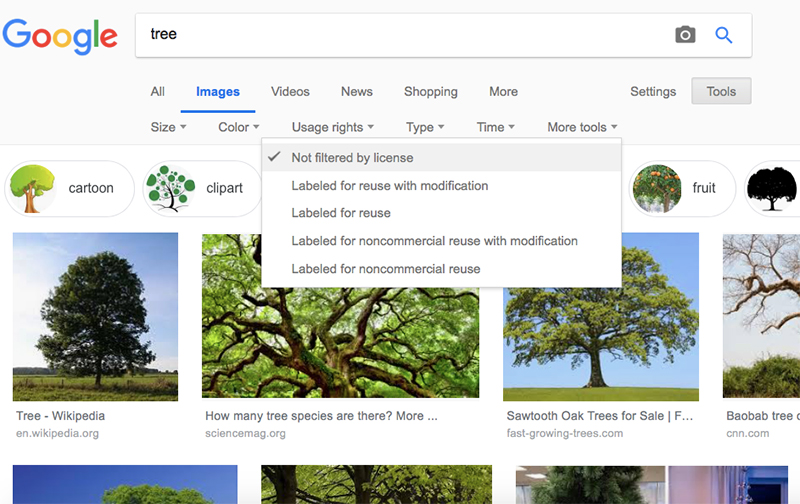
google-images-rights


Foster conversations.
Today’s audiences don’t want just to be talked at — they want to be a part of the experience, Margaritis said. “They want to have a two-way conversation,” he said.

To help keep students engaged, Popova recommends using tools that allow them to interact. She uses PollEverywhere to survey her students and create word clouds in real time that allow her to gauge whether they are understanding the content. Colleagues use similar interactive tools for presentations, such as Socrative and Mentimeter, she said.

To encourage conversation, Margaritis allows the audience some time to process what they’ve heard so far through an approach known as QRS: question, response, share. (He credits David Brobeck of Walsh University in Canton, Ohio, with the QRS strategy. Faculty may also know it as the “think, pair, share” technique).

“I will post a question, have them reflect on the issue for 30 seconds, and then spend two to three minutes sharing their thoughts with their partners,” he said.

This approach makes an audience more likely to interact with you, he said, “because it gives them time to reflect on the question and share their thoughts to validate their thinking before sharing with the entire class.”

Advertisement

Be prepared for questions and tangents. It takes effort to give an engaging presentation and keep track of time, all while standing in front of dozens of people. The key is lots of practice, Popova said.

“Over the years I have learned to get back on topic if distraction is presented by knowing which slides I could skip if someone takes me off course,” she said, “and to be flexible enough to skip those ‘disposable’ slides without hurting my main point.”

Having that flexibility in the presentation actually seems key to fostering discussion and learning, Margaritis said. He allows audiences to go off on tangents if they prove productive. “We need to give the audience the latitude to veer off the stated course the instructor has set, to open their curiosity and begin to explore,” he said.

Samiha Khanna is a freelance writer based in North Carolina. To comment on this article or to suggest an idea for another article, contact senior editor Courtney Vien at Courtney.Vien@aicpa-cima.com.


Advertisement

latest news

January 21, 2026

Fraud and technology: How to handle the double-edged sword

January 20, 2026

Undergraduate enrollment in accounting continues to rise

January 20, 2026

Cost-of-living increases could hurt 2026 financial goals, poll says

January 16, 2026

IRS Advisory Council report defends workers, criticizes budget and staff cuts

January 16, 2026

AICPA tax policy and advocacy successes: 2025 highlights

Advertisement

Most Read

Filing season quick guide — tax year 2025
IRS to start accepting and processing tax returns on Jan. 26
Business standard mileage rate increases for 2026
Second Circuit denies SALT cap workaround
Get ready for tax season
Advertisement

Podcast

January 22, 2026

Accountability the ‘No. 1 thing’ and other reflections from Bill Reeb

January 15, 2026

Tom Hood on AI, hybrid work, and other 2026 themes shaping accounting

January 8, 2026

Getting unstuck by rethinking processes, people, and AI

Features

Get ready for tax season

Get ready for tax season

Filing season quick guide — tax year 2025

Filing season quick guide — tax year 2025

How a CPA beat burnout after strokes, years of depression

How a CPA beat burnout after strokes, years of depression

Tax-efficient drawdown strategies in retirement

Tax-efficient drawdown strategies in retirement

Simple but effective AI use cases for CAS

Simple but effective AI use cases for CAS

Shaping AI governance and controls

Shaping AI governance and controls

FROM THIS MONTH'S ISSUE

Tax season quick guide

Get ready for tax season with the JofA’s annual filing season quick guide, an easy-to-use compilation of dollar thresholds, tax tables, standard amounts, credits, and deductions. Download and print for quick reference this tax season.

From The Tax Adviser

December 31, 2025

Practical tax advice for businesses as a result of the OBBBA

November 30, 2025

How a CPA and wealth adviser partnership can guide families through transition

November 30, 2025

Digital asset transactions: Broker reporting, amount realized, and basis

October 31, 2025

Recent developments in estate planning

MAGAZINE

January 2026

January 2026

January 2026
December 2025

December 2025

December 2025
November 2025

November 2025

November 2025
October 2025

October 2025

October 2025
September 2025

September 2025

September 2025
August 2025

August 2025

August 2025
July 2025

July 2025

July 2025
June 2025

June 2025

June 2025
May 2025

May 2025

May 2025
April 2025

April 2025

April 2025
March 2025

March 2025

March 2025
February 2025

February 2025

February 2025
view all

View All

http://JofA_Default_Mag_cover_small_official_blue

PUSH NOTIFICATIONS

Learn about important news

This quick guide walks you through the process of enabling and troubleshooting push notifications from the JofA on your computer or phone.

CPA LETTER DAILY EMAIL

CPA Letter Logo

Subscribe to the daily CPA Letter

Stay on top of the biggest news affecting the profession every business day. Follow this link to your marketing preferences on aicpa-cima.com to subscribe. If you don't already have an aicpa-cima.com account, create one for free and then navigate to your marketing preferences.

Connect

  • X Logo JofA on X
  • facebook JofA on Facebook

HOME

  • News
  • Monthly issues
  • Podcast
  • A&A Focus
  • PFP Digest
  • Academic Update
  • Topics
  • RSS feed rss feed
  • Site map

ABOUT

  • Contact us
  • Advertise
  • Submit an article
  • Editorial calendar
  • Privacy policy
  • Terms & conditions

SUBSCRIBE

  • Academic Update
  • CPE Express

AICPA & CIMA SITES

  • AICPA-CIMA.com
  • Global Engagement Center
  • Financial Management (FM)
  • The Tax Adviser
  • AICPA Insights
  • Global Career Hub
AICPA & CIMA

© 2026 Association of International Certified Professional Accountants. All rights reserved.

Reliable. Resourceful. Respected.