Skip to content
AICPA-CIMA
  • AICPA & CIMA:
  • Home
  • CPE & Learning
  • My Account
Journal of Accountancy
  • TECH & AI
    • All articles
    • Artificial Intelligence (AI)
    • Microsoft Excel
    • Information Security & Privacy

    Latest Stories

    • Fraud and technology: How to handle the double-edged sword
    • Report: AI speeds up work but fails to deliver real business value
    • CFOs signal crucial role that technology will play in 2026
  • TAX
    • All articles
    • Corporations
    • Employee benefits
    • Individuals
    • IRS procedure

    Latest Stories

    • IRS will stay fully staffed for first five 5 days of shutdown
    • New law, IRS workforce cuts raise red flags for tax season, reports say
    • SECURE 2.0 amendment deadline extended for IRAs, other retirement plans
  • PRACTICE MANAGEMENT
    • All articles
    • Diversity, equity & inclusion
    • Human capital
    • Firm operations
    • Practice growth & client service

    Latest Stories

    • IRS will stay fully staffed for first five 5 days of shutdown
    • New law, IRS workforce cuts raise red flags for tax season, reports say
    • SECURE 2.0 amendment deadline extended for IRAs, other retirement plans
  • FINANCIAL REPORTING
    • All articles
    • FASB reporting
    • IFRS
    • Private company reporting
    • SEC compliance and reporting

    Latest Stories

    • SEC proposes amendments to small entity definitions
    • Key signals from the SEC-PCAOB conference point to a busy new year
    • New SEC chair to CPAs: ‘Back to basics’
  • AUDIT
    • All articles
    • Attestation
    • Audit
    • Compilation and review
    • Peer review
    • Quality Management

    Latest Stories

    • 5 imperatives for auditors from the PCAOB chair
    • Key signals from the SEC-PCAOB conference point to a busy new year
    • Audit transformation road map: New report lays out the journey
  • MANAGEMENT ACCOUNTING
    • All articles
    • Business planning
    • Human resources
    • Risk management
    • Strategy

    Latest Stories

    • Report: AI speeds up work but fails to deliver real business value
    • How a CPA beat burnout after strokes, years of depression
    • Overall economic view slides, but CPAs feel better about their companies
  • Home
  • News
  • Magazine
  • Podcast
  • Topics
Advertisement
  1. newsletter
  2. Extra Credit
Extra Credit Cover

Performing a simple linear regression in Excel

By Wendy Tietz, CPA, Ph.D.; Jennifer Cainas, CPA, DBA; and Tracie Miller-Nobles, CPA
November 9, 2021

Please note: This item is from our archives and was published in 2021. It is provided for historical reference. The content may be out of date and links may no longer function.

TOPICS

  • Technology
    • Microsoft Excel
  • Accounting Education

When teaching cost behavior in a managerial or cost accounting course, we explain that there are various methods a company can use to estimate its fixed and variable costs, including regression analysis. The next time you cover this topic, consider teaching students how to perform a simple linear regression analysis in Excel.  Below is an example screenshot illustrating 12 months of cost data for a restaurant.  

ec1-regression-analysis-example

To perform a simple linear regression to estimate the restaurant’s fixed and variable costs, perform the following steps.  

Step 1: Click on the Data tab, and then click Data Analysis (in the Analysis group). (Note: If you don’t have the Data Analysis option, you will need to install the Analysis ToolPak add-in. See our previous article on how to do this.)

ec2-data-analysis

Step 2: Select Regression and then click OK.

ec3-regression

Step 3: In the Regression dialog box that pops up, you must identify your Y variable, which is the dependent variable. In this example the dependent variable is the “total costs” column. Select the data in this column.

ec4-regression-input-y-range

Step 4: You must also identify your X variable, which is your independent variable. In this example the independent variable is the “# of meals” column. Select the data in this column, then click OK. 

ec5-regression-input-x-range

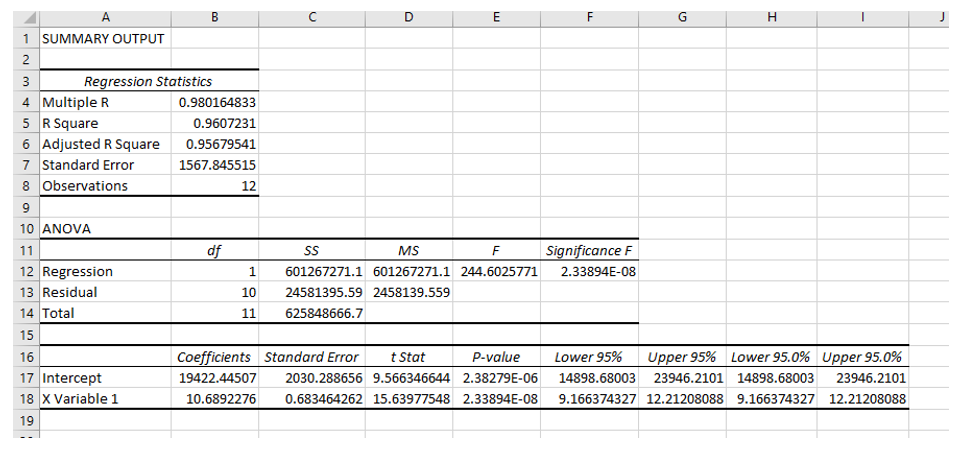
The default option is for the regression results to be inserted into a new worksheet. You will see the results in a different place if you have selected a different output option. We chose to have the regression results inserted into Sheet2 of our workbook, and the results are below:  
Advertisement
ec6-summary-output

Now that you have the regression results, you can discuss with the students the key pieces of information being displayed, including the coefficients (the intercept representing the fixed costs, and the X variable 1 representing the variable costs) and how to interpret the R square and adjusted R square values.

The next time you teach cost behavior, consider expanding your students’ Excel skills by teaching them how to perform a simple linear regression, one of the many options within the Data Analysis function.

— Wendy Tietz, CPA, CGMA, Ph.D., is a professor of accounting at Kent State University in Kent. Ohio; Jennifer Cainas, CPA, DBA, is a clinical professor at the University of South Florida in Tampa; and Tracie Miller-Nobles, CPA, is an associate professor of accounting at Austin Community College in Austin, Texas. See their site AccountingIsAnalytics.com for resources they have developed for teaching data analytics in introductory accounting. To comment on this article or to suggest an idea for another article, contact senior editor Courtney Vien at Courtney.Vien@aicpa-cima.com.


Advertisement

latest news

January 30, 2026

IRS will stay fully staffed for first five 5 days of shutdown

January 28, 2026

New law, IRS workforce cuts raise red flags for tax season, reports say

January 27, 2026

SECURE 2.0 amendment deadline extended for IRAs, other retirement plans

January 23, 2026

IRS releases FAQs on qualified overtime pay deduction under H.R. 1

January 21, 2026

Fraud and technology: How to handle the double-edged sword

Advertisement

Most Read

Filing season quick guide — tax year 2025
IRS to start accepting and processing tax returns on Jan. 26
How a CPA beat burnout after strokes, years of depression
Business standard mileage rate increases for 2026
Tax-efficient drawdown strategies in retirement
Advertisement

Podcast

January 29, 2026

Why stablecoin controls create a solid foundation in an evolving environment

January 22, 2026

Accountability the ‘No. 1 thing’ and other reflections from Bill Reeb

January 15, 2026

Tom Hood on AI, hybrid work, and other 2026 themes shaping accounting

Features

Get ready for tax season

Get ready for tax season

Filing season quick guide — tax year 2025

Filing season quick guide — tax year 2025

How a CPA beat burnout after strokes, years of depression

How a CPA beat burnout after strokes, years of depression

Tax-efficient drawdown strategies in retirement

Tax-efficient drawdown strategies in retirement

Simple but effective AI use cases for CAS

Simple but effective AI use cases for CAS

Shaping AI governance and controls

Shaping AI governance and controls

FROM THIS MONTH'S ISSUE

Tax-efficient drawdown strategies in retirement

Want to stretch retirement funds and avoid tax pitfalls? This article shares tips and models for smarter drawdown strategies that maximize after-tax wealth, manage Social Security and Medicare impacts, and minimize surprises. Also see: Tax season preview and quick guide.

From The Tax Adviser

December 31, 2025

Practical tax advice for businesses as a result of the OBBBA

November 30, 2025

How a CPA and wealth adviser partnership can guide families through transition

November 30, 2025

Digital asset transactions: Broker reporting, amount realized, and basis

October 31, 2025

Recent developments in estate planning

MAGAZINE

January 2026

January 2026

January 2026
December 2025

December 2025

December 2025
November 2025

November 2025

November 2025
October 2025

October 2025

October 2025
September 2025

September 2025

September 2025
August 2025

August 2025

August 2025
July 2025

July 2025

July 2025
June 2025

June 2025

June 2025
May 2025

May 2025

May 2025
April 2025

April 2025

April 2025
March 2025

March 2025

March 2025
February 2025

February 2025

February 2025
view all

View All

http://JofA_Default_Mag_cover_small_official_blue

PUSH NOTIFICATIONS

Learn about important news

This quick guide walks you through the process of enabling and troubleshooting push notifications from the JofA on your computer or phone.

CPA LETTER DAILY EMAIL

CPA Letter Logo

Subscribe to the daily CPA Letter

Stay on top of the biggest news affecting the profession every business day. Follow this link to your marketing preferences on aicpa-cima.com to subscribe. If you don't already have an aicpa-cima.com account, create one for free and then navigate to your marketing preferences.

Connect

  • X Logo JofA on X
  • facebook JofA on Facebook

HOME

  • News
  • Monthly issues
  • Podcast
  • A&A Focus
  • PFP Digest
  • Academic Update
  • Topics
  • RSS feed rss feed
  • Site map

ABOUT

  • Contact us
  • Advertise
  • Submit an article
  • Editorial calendar
  • Privacy policy
  • Terms & conditions

SUBSCRIBE

  • Academic Update
  • CPE Express

AICPA & CIMA SITES

  • AICPA-CIMA.com
  • Global Engagement Center
  • Financial Management (FM)
  • The Tax Adviser
  • AICPA Insights
  • Global Career Hub
AICPA & CIMA

© 2026 Association of International Certified Professional Accountants. All rights reserved.

Reliable. Resourceful. Respected.