Skip to content
AICPA-CIMA
  • AICPA & CIMA:
  • Home
  • CPE & Learning
  • My Account
Journal of Accountancy
  • TECH & AI
    • All articles
    • Artificial Intelligence (AI)
    • Microsoft Excel
    • Information Security & Privacy

    Latest Stories

    • IRS IT overhaul set to finish by 2028, former official says
    • Shaping AI governance and controls
    • Simple but effective AI use cases for CAS
  • TAX
    • All articles
    • Corporations
    • Employee benefits
    • Individuals
    • IRS procedure

    Latest Stories

    • Prop. regs. amend Sec. 3406 backup withholding regulations
    • IRS IT overhaul set to finish by 2028, former official says
    • IRS to start accepting and processing tax returns on Jan. 26
  • PRACTICE MANAGEMENT
    • All articles
    • Diversity, equity & inclusion
    • Human capital
    • Firm operations
    • Practice growth & client service

    Latest Stories

    • Stablecoin reporting: AICPA’s updated criteria includes controls
    • 5 imperatives for auditors from the PCAOB chair
    • Prop. regs. amend Sec. 3406 backup withholding regulations
  • FINANCIAL REPORTING
    • All articles
    • FASB reporting
    • IFRS
    • Private company reporting
    • SEC compliance and reporting

    Latest Stories

    • SEC proposes amendments to small entity definitions
    • Key signals from the SEC-PCAOB conference point to a busy new year
    • New SEC chair to CPAs: ‘Back to basics’
  • AUDIT
    • All articles
    • Attestation
    • Audit
    • Compilation and review
    • Peer review
    • Quality Management

    Latest Stories

    • 5 imperatives for auditors from the PCAOB chair
    • Key signals from the SEC-PCAOB conference point to a busy new year
    • Audit transformation road map: New report lays out the journey
  • MANAGEMENT ACCOUNTING
    • All articles
    • Business planning
    • Human resources
    • Risk management
    • Strategy

    Latest Stories

    • How a CPA beat burnout after strokes, years of depression
    • Overall economic view slides, but CPAs feel better about their companies
    • As Finance Duties Shift, CAOs Take On Strategic Role
  • Home
  • News
  • Magazine
  • Podcast
  • Topics
Advertisement
  1. newsletter
  2. Extra Credit
Extra Credit Cover

The Excel Advanced Filter function gives you flexibility

By Wendy Tietz, CPA, Ph.D.; Jennifer Cainas, CPA, DBA; and Tracie Miller-Nobles, CPA
October 12, 2021

Please note: This item is from our archives and was published in 2021. It is provided for historical reference. The content may be out of date and links may no longer function.

Related

January 9, 2026

IRS IT overhaul set to finish by 2028, former official says

January 8, 2026

Getting unstuck by rethinking processes, people, and AI

January 1, 2026

Shaping AI governance and controls

TOPICS

  • Technology
    • Microsoft Excel
  • Accounting Education

The Excel AutoFilter feature allows you to narrow your data based on certain criteria and extract records that match those criteria. To turn on a filter, select the cells with data that you want to filter, click the Data tab in the Ribbon, and then click Filter. Dropdown arrows will appear on the column headings, giving you options to filter the data based on the criteria you are searching for.

In addition to AutoFilter, you can create a custom filter by using the Advanced Filter tool. Advanced Filter allows you to generate a unique list of items and extract those items to another place in your worksheet or workbook.  

Advanced Filter has several useful features. It allows you to apply several filter criteria simultaneously to the entire data file, which AutoFilter does not. It also lets you easily change the criteria by typing new values directly into the criteria cells. Additionally, Advanced Filter enables you to copy the filtered data to a specified area within the same worksheet or a different worksheet rather than just filter the data within the original data file. This can be very helpful with a large data file such as a gradebook.

Here’s an example of how you can use Advanced Filter. Suppose that you want to identify each student with an A for the midterm grade in section 1 of your class so that you can email those students and invite them to an honors banquet, but you have a merged gradebook. You can use the Advanced Filter function to filter this information and copy it into a separate area of the worksheet or a new worksheet for further analysis.

A best practice is to start by inserting several rows above your dataset. In the screenshot below, we have added seven rows above the original data.  
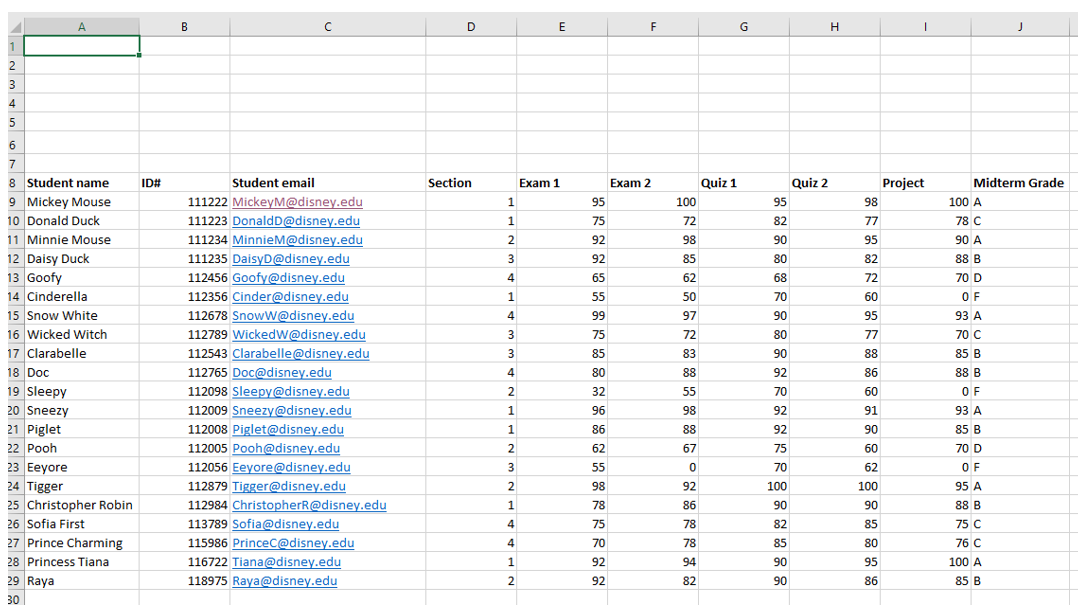
excel-advanced-filter-1


Next, use the blank rows to set up and apply the criteria. Input “Midterm Grade” and “Section” in two of the empty cells and then input “A” in the cell below Midterm Grade and “1” in the cell below Section, as seen in the screenshot below. When you set up your criteria, we suggest copying the column headings you want to include directly from your original data sheet.

excel-advanced-filter-2


Now you need to determine the filter results you want displayed. You can have the results appear on the same worksheet or in a different worksheet within your workbook. To keep this simple, we will show you how to display the search results within the same spreadsheet.

Advertisement

To begin, you need to specify the filter results you need — in this case, Student name and Student email — and where the information should appear on the spreadsheet. Add the column headings for Student name and Student email to the right of your original data file, as seen in the screenshot below. Then, click on the Advanced button.

excel-advanced-filter-3


A pop-up box will appear that asks you to specify your list range, your criteria range, and where you would like the results to display. First, click the dropdown arrow under “List Range” and select your data range.
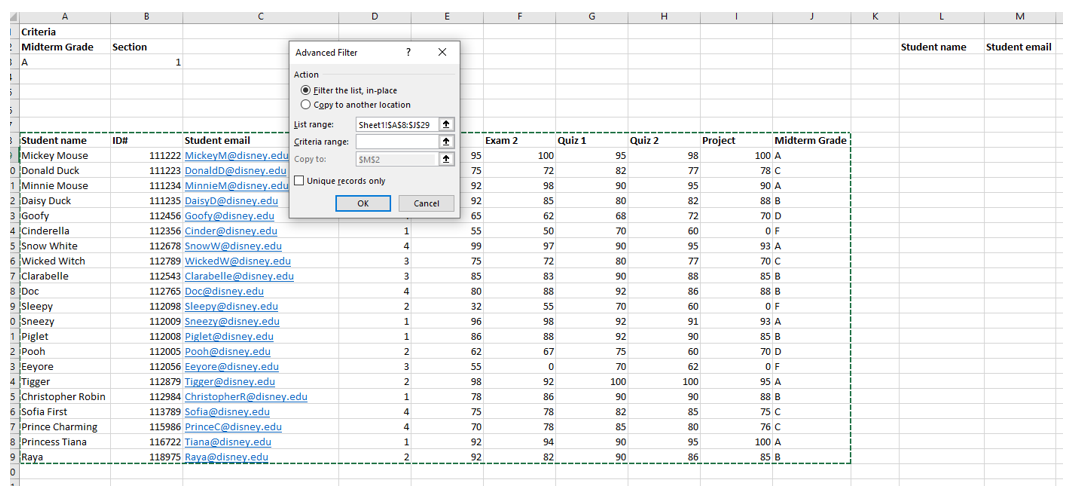
excel-advanced-filter-4


Next, select your criteria range. Include both your column headings and the criteria.
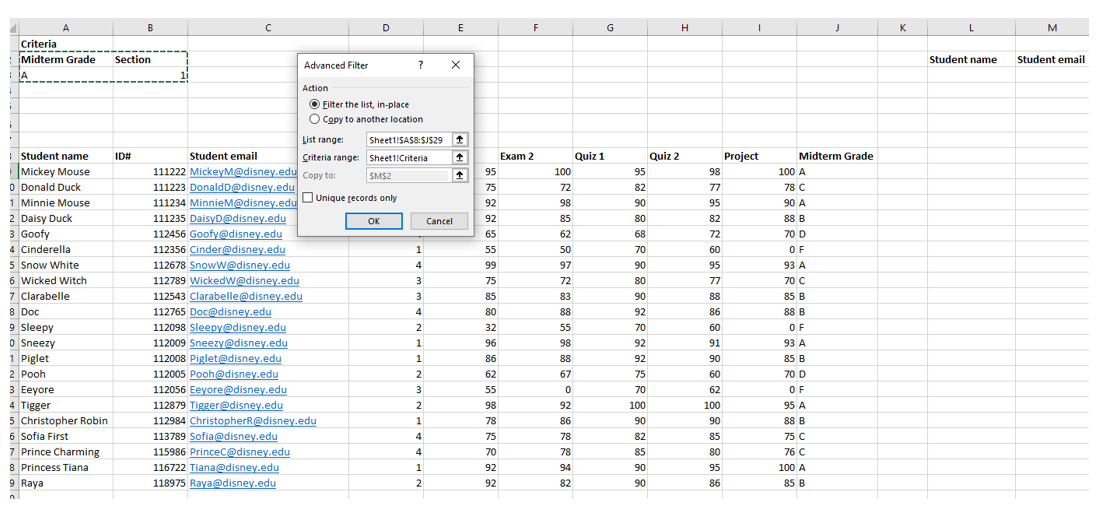
excel-advanced-filter-5


Finally, state where you would like the results to display. Choose the “Copy to another location” option, select the filter results you want displayed (in this case, Student name and Student email), and where to display them (in this case, the cells below Student name and Student email).

excel-advanced-filter-6


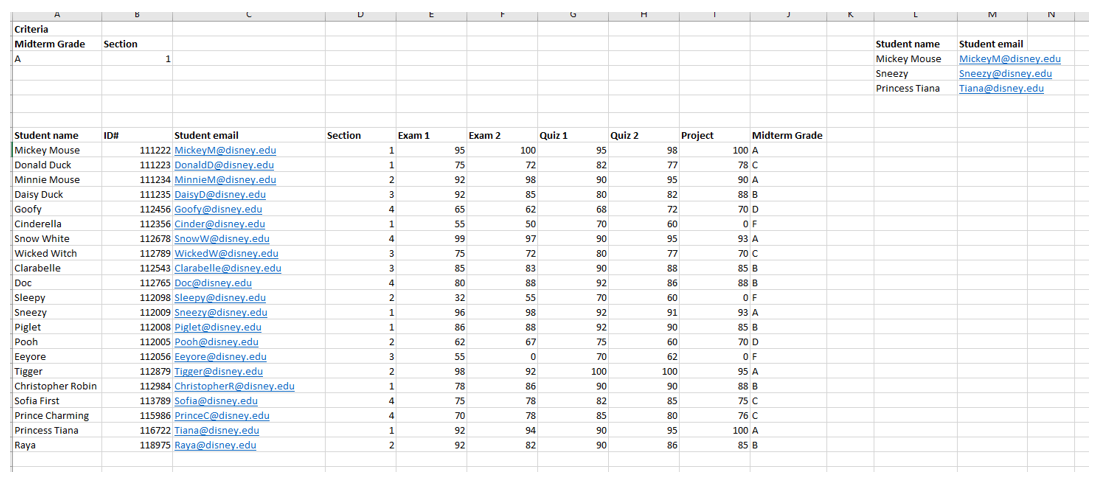
Click OK. As you can see from the screenshot below, the results indicate that three students from Section 1 have a midterm grade of an A, and their names and email addresses are displayed.
excel-advanced-filter-7


— Wendy Tietz, CPA, CGMA, Ph.D., is a professor of accounting at Kent State University in Kent, Ohio; Jennifer Cainas, CPA, DBA, is an instructor of accountancy at the University of South Florida in Tampa; and Tracie Miller-Nobles, CPA, is an associate professor of accounting at Austin Community College in Austin, Texas. See their site AccountingIsAnalytics.com for resources they have developed for teaching data analytics in introductory accounting. To comment on this article or to suggest an idea for another article, contact senior editor Courtney Vien at Courtney.Vien@aicpa-cima.com.


Advertisement

latest news

January 12, 2026

Stablecoin reporting: AICPA’s updated criteria includes controls

January 12, 2026

5 imperatives for auditors from the PCAOB chair

January 9, 2026

Prop. regs. amend Sec. 3406 backup withholding regulations

January 9, 2026

SEC proposes amendments to small entity definitions

January 9, 2026

IRS IT overhaul set to finish by 2028, former official says

Advertisement

Most Read

IRS clarifies health savings account changes in H.R. 1 in new notice
IRS to start accepting and processing tax returns on Jan. 26
Corporate Transparency Act, source of BOI reporting mandate, held constitutional
Tax provisions in the One Big Beautiful Bill Act
Business standard mileage rate increases for 2026
Advertisement

Podcast

January 8, 2026

Getting unstuck by rethinking processes, people, and AI

December 17, 2025

Are CPA firms ready for the next wave of data security threats?

December 11, 2025

Why 2026 is another ‘big tax year’

Features

Get ready for tax season

Get ready for tax season

Filing season quick guide — tax year 2025

Filing season quick guide — tax year 2025

How a CPA beat burnout after strokes, years of depression

How a CPA beat burnout after strokes, years of depression

Tax-efficient drawdown strategies in retirement

Tax-efficient drawdown strategies in retirement

Simple but effective AI use cases for CAS

Simple but effective AI use cases for CAS

Shaping AI governance and controls

Shaping AI governance and controls

FROM THIS MONTH'S ISSUE

How a CPA beat burnout after strokes, depression

Randy Crabtree, CPA, suffered two strokes in four days and struggled with his mental health for years before he learned to recognize, address, and prevent chronic stress. Learn from his insights on how CPAs can avoid professional burnout.

From The Tax Adviser

December 31, 2025

Practical tax advice for businesses as a result of the OBBBA

November 30, 2025

How a CPA and wealth adviser partnership can guide families through transition

November 30, 2025

Digital asset transactions: Broker reporting, amount realized, and basis

October 31, 2025

Recent developments in estate planning

MAGAZINE

January 2026

January 2026

January 2026
December 2025

December 2025

December 2025
November 2025

November 2025

November 2025
October 2025

October 2025

October 2025
September 2025

September 2025

September 2025
August 2025

August 2025

August 2025
July 2025

July 2025

July 2025
June 2025

June 2025

June 2025
May 2025

May 2025

May 2025
April 2025

April 2025

April 2025
March 2025

March 2025

March 2025
February 2025

February 2025

February 2025
view all

View All

http://JofA_Default_Mag_cover_small_official_blue

PUSH NOTIFICATIONS

Learn about important news

This quick guide walks you through the process of enabling and troubleshooting push notifications from the JofA on your computer or phone.

CPA LETTER DAILY EMAIL

CPA Letter Logo

Subscribe to the daily CPA Letter

Stay on top of the biggest news affecting the profession every business day. Follow this link to your marketing preferences on aicpa-cima.com to subscribe. If you don't already have an aicpa-cima.com account, create one for free and then navigate to your marketing preferences.

Connect

  • X Logo JofA on X
  • facebook JofA on Facebook

HOME

  • News
  • Monthly issues
  • Podcast
  • A&A Focus
  • PFP Digest
  • Academic Update
  • Topics
  • RSS feed rss feed
  • Site map

ABOUT

  • Contact us
  • Advertise
  • Submit an article
  • Editorial calendar
  • Privacy policy
  • Terms & conditions

SUBSCRIBE

  • Academic Update
  • CPE Express

AICPA & CIMA SITES

  • AICPA-CIMA.com
  • Global Engagement Center
  • Financial Management (FM)
  • The Tax Adviser
  • AICPA Insights
  • Global Career Hub
AICPA & CIMA

© 2026 Association of International Certified Professional Accountants. All rights reserved.

Reliable. Resourceful. Respected.